
Field Service App for Plumbers, Electricians and Handymen: Customer Jobs, Technician Schedules and AI-Checked Photos of Every Repair
CosaNostra runs the day of a small home-service team. A customer's message becomes a job with an address, a time and an assigned technician. Every visit sits in one calendar next to the team's shifts. The technician closes each step with a before-and-after photo that AI checks, so you know the job is done without calling to ask.


Features
Talk to the app like a dispatcher. Jobs, visits and shifts — by voice.
"Tomorrow at 10, leaking tap at 14 Oak Street, customer Mark, phone ending 0155 — send Alex, photo before and after."

Your team's order calendar on one screen: every visit, every technician and every shift for the day, week or month.
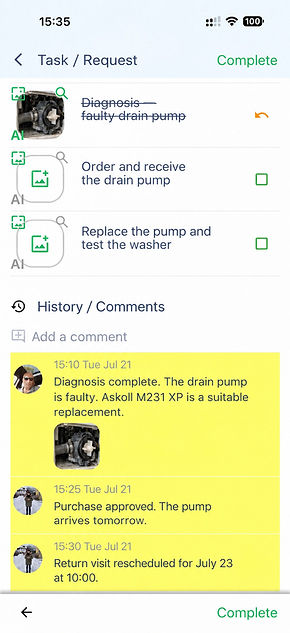
All stages — from diagnosis to repair — on the order page: the technician ticks off each stage with a photo, and you see where the job stands.


AI verifies completed work from a photo — the installed pump, the replaced outlet, the cleaned filter are compared with the reference and scored, so you only open the jobs that fall below your threshold.
Comments, photos and job history — all in one place: what was found, what was replaced and when to come back.

Plan shifts and track technician check-ins: who is on duty today, who covers a sick colleague, and when each technician checked in.
A job from a customer message — in seconds. Share a screenshot or the text of your conversation with the customer — AI understands the request, the address, the phone and the time, and creates the job.


Write all the details — "Bosch washer won't drain, 14 Oak Street, tomorrow 10–12, Alex, remind an hour before" — and AI will identify the time and assignee and fill in the required fields.

CosaNostra is a better alternative to running a home-service team in WhatsApp groups! Unlike chats where customer requests, addresses and photos get lost among messages, the app turns every message into a job with an address, a time and a specific technician, and checks every before-and-after photo with AI. Nothing is forgotten — every visit has a date and a deadline. Each technician sees only their own jobs and shifts, without the noise.

Pricing
Two
Group of up to
2 users
Always free
Five
Group up to
5 users
5,99$ per month
Twenty
Group up to
20 users
19,99$ per month
Hundred
Group up to
100 users
59,99$ per month
FAQ
How does AI photo verification work?
What happens if AI rejects a photo?
Can I check on technicians without calling every half hour?
How does a job get in from WhatsApp or email?
Can I create a job with a single sentence or by voice?
How do job stages work?
How do I handle yearly AC maintenance visits?
How do I schedule shifts and replacements?
Does it work for a solo technician?
Does it replace field service software with invoices and estimates?
Do I need hardware or long training?
How much does it cost and is there a free plan?

What a day looks like with CosaNostra
A customer writes on WhatsApp that the washer won't drain — the owner shares the screenshot, AI creates the job, the technician on duty gets it in a tap.
Morning
The technician closes the diagnosis and repair stages with before-and-after photos — AI accepts them, the owner sees "done" without a single call.
Afternoon
Next week's shifts are set in the same calendar, two yearly AC maintenance visits came up on their own as recurring jobs.
Friday
Who CosaNostra is for in field service
Plumbing and electrical services: calls from customers become jobs with an address and a time, every repair closed with a photo.
Handyman businesses: a checklist for each type of job, from hanging a shelf to assembling furniture, and a photo of the result.
Home air conditioning installation and servicing: installs with stages, yearly maintenance visits as recurring jobs.
Appliance repair at the customer's home: diagnosis, parts ordered, repair — stages with photos and the full history of the job.
Locksmiths and door and window installers: urgent calls from chat, the technician on duty sees the job in seconds.